 wassender
Every customer gets their own message.
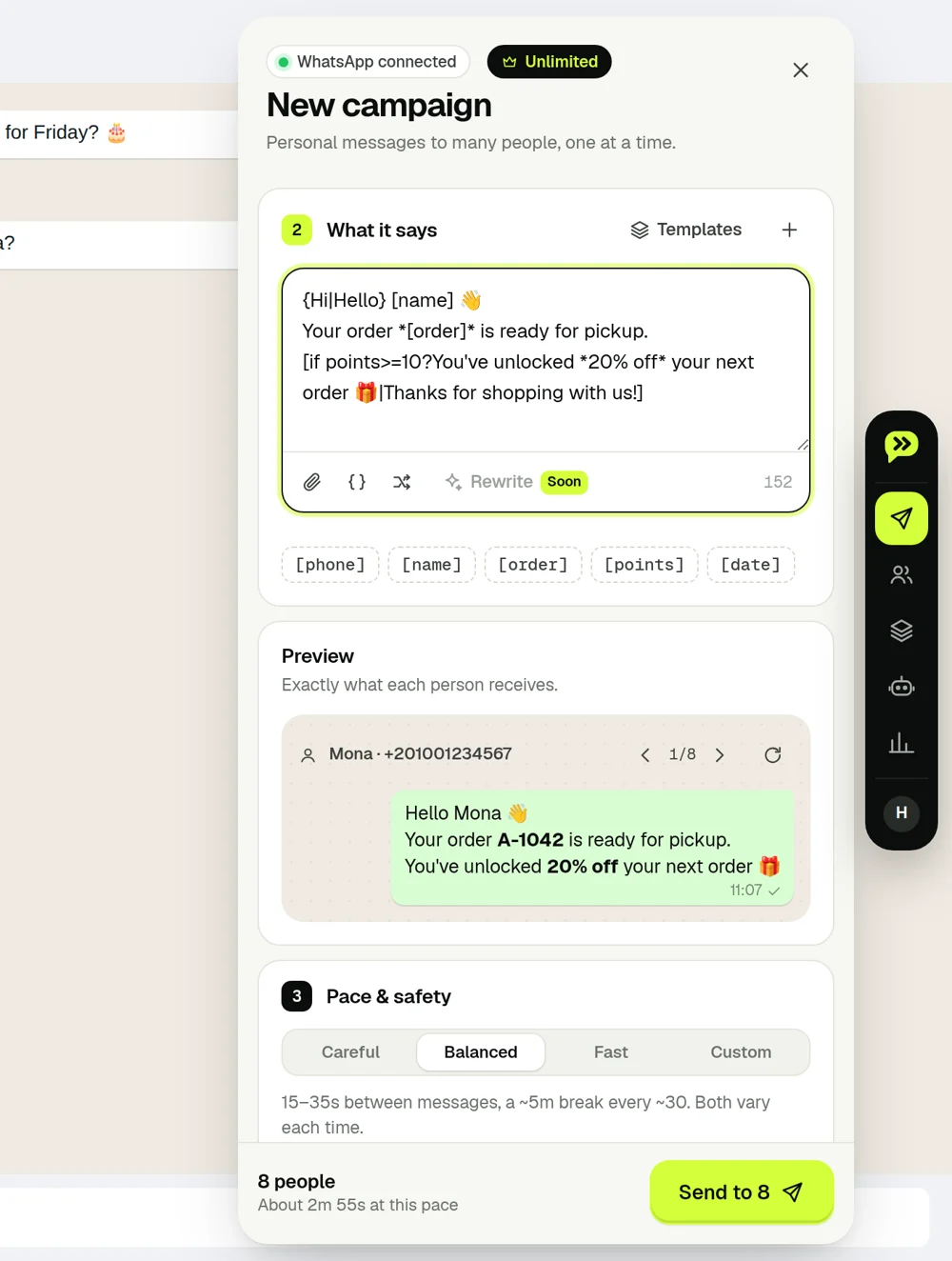
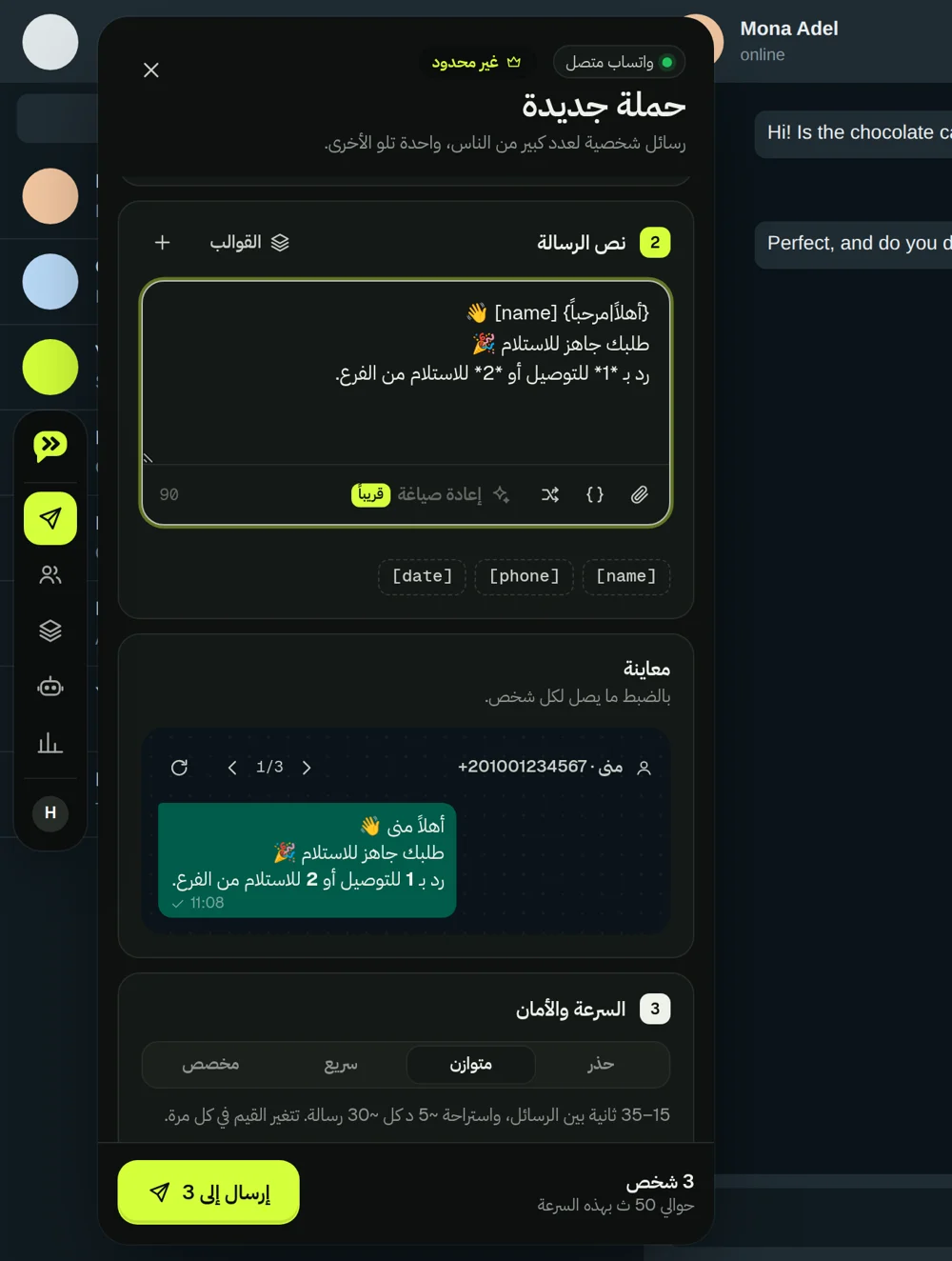
Columns become variables, empty cells fall back gracefully, and a live preview shows exactly what each person receives.
The free WhatsApp bulk sender Chrome extension — now with screen privacy, customer notes and voice notes as text. Import Excel or CSV and every customer gets their own message; then remember what each one ordered, paid and asked for.
For desktop Chrome and WhatsApp Web. Start with customers who expect your message.
Paste numbers, drop an Excel or CSV file, or pull members from a WhatsApp group or label.
Use [name], [order] or any column. Add conditions and wording variations. Preview every single message.
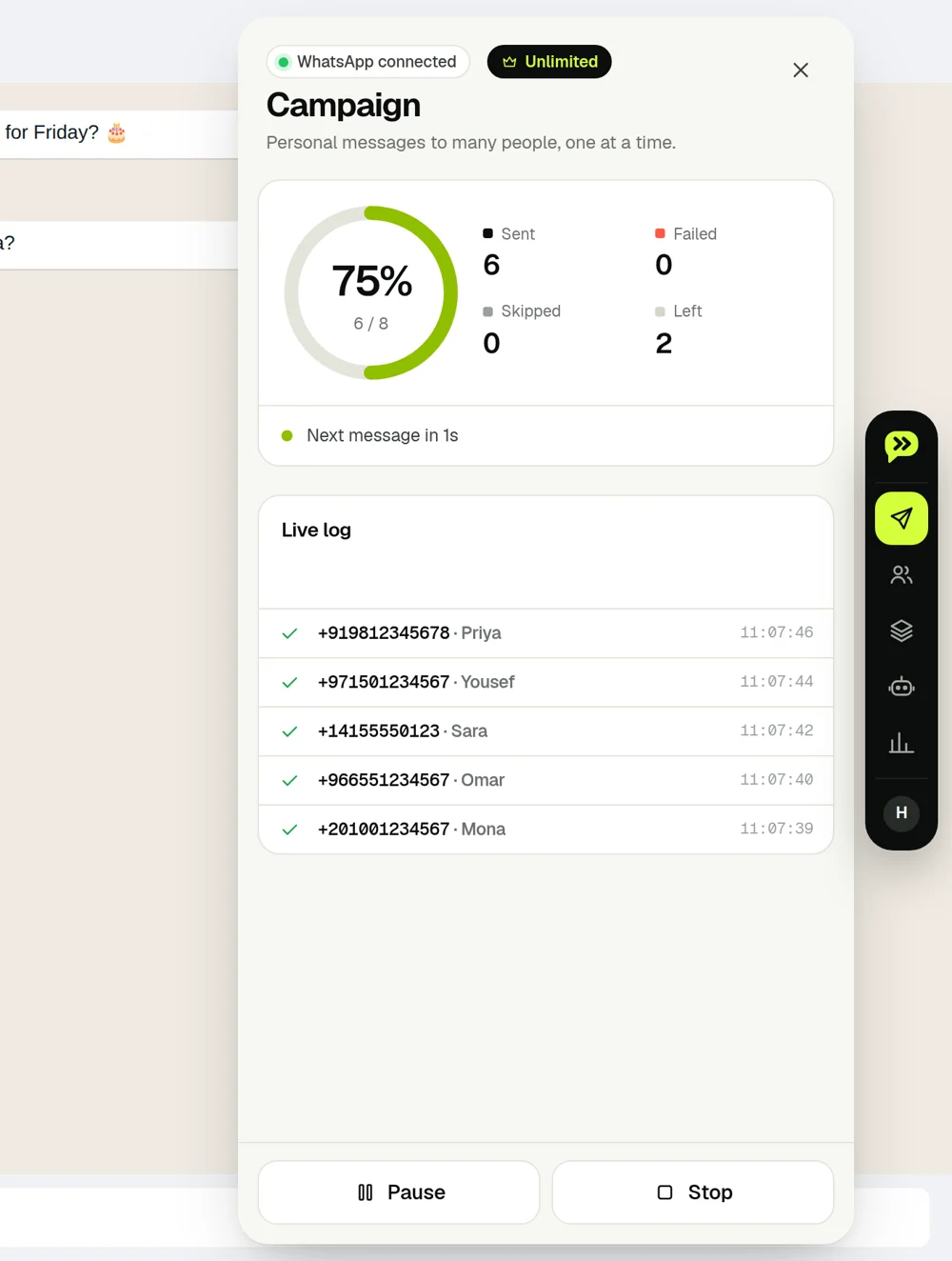
Human pacing, rests, daily limits and sending hours — then watch every message land in a live log.
No new inbox, no new app. A slim dock on the side of WhatsApp Web — press Alt + W and it's there.
Columns become variables, empty cells fall back gracefully, and a live preview shows exactly what each person receives.
Write one message that adapts to customer details. Set a condition and choose what each person sees.
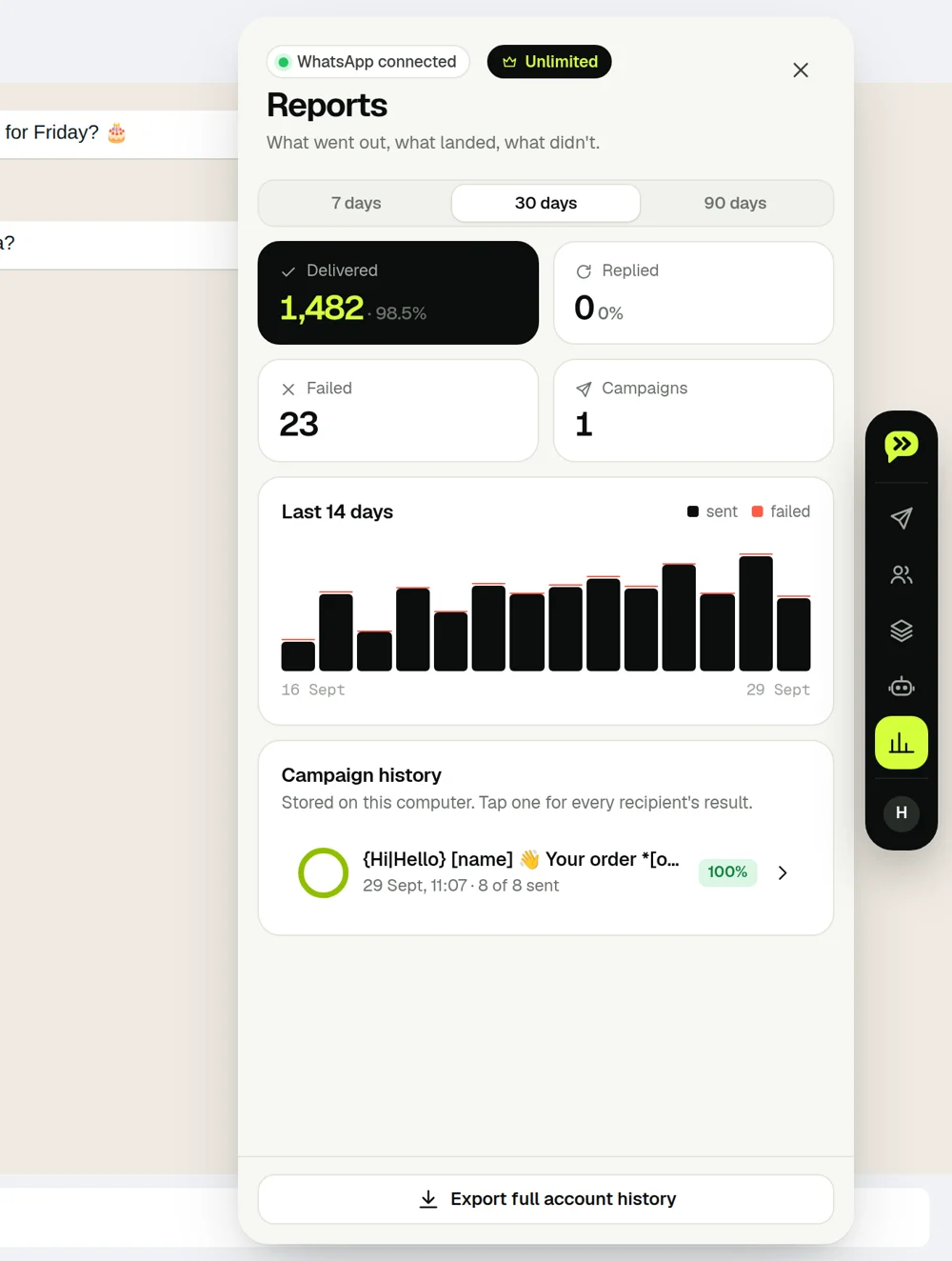
Sent, failed and skipped — with reasons. Pause, resume, retry the failed ones.
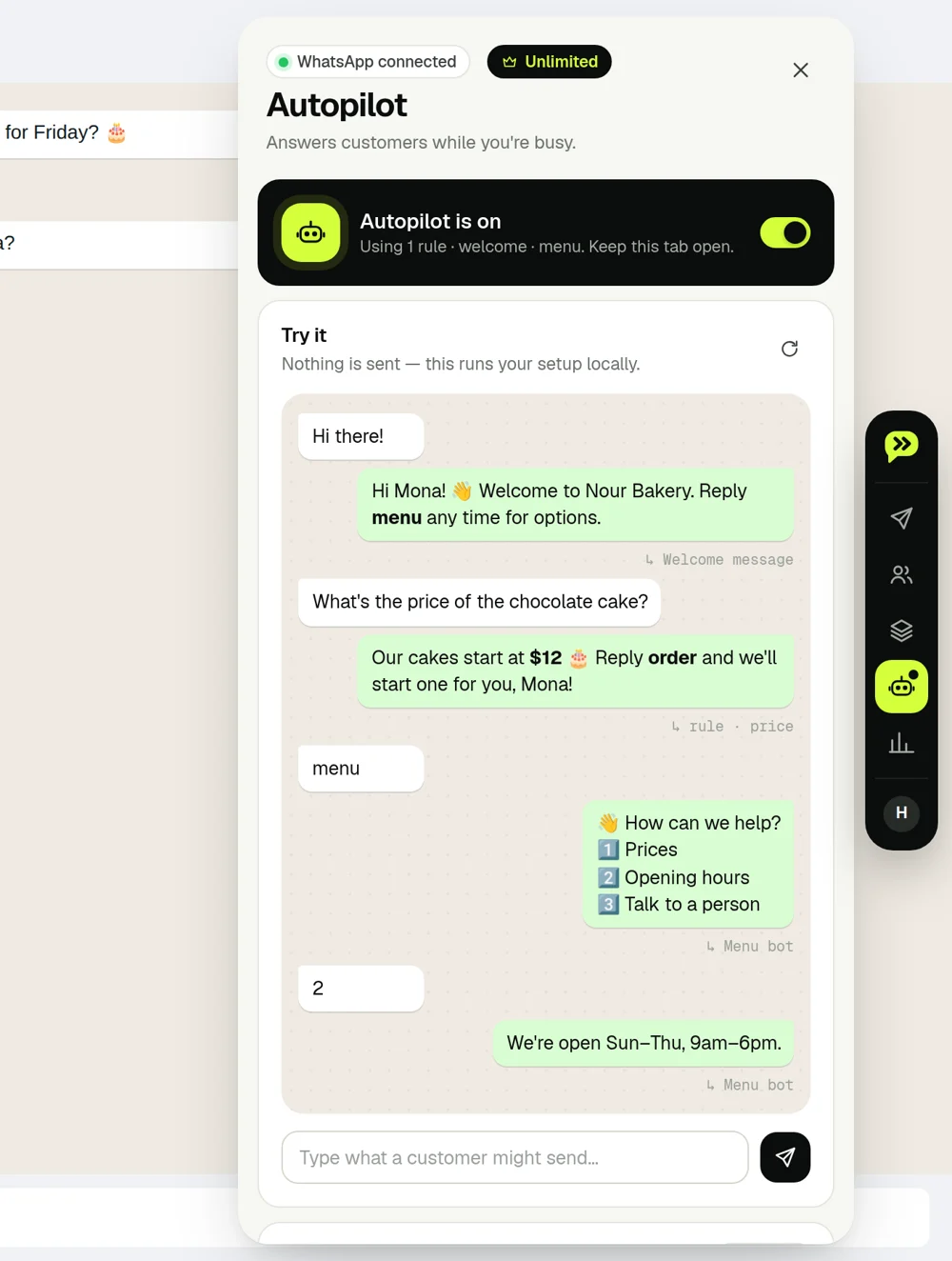
Keyword replies (Arabic spelling variants included), welcome messages, away hours and numbered menu bots. Test it all in a simulator before it goes live.
Schedule a campaign while WhatsApp Web stays open. Track replies for 14 days, then prepare a follow-up for people who haven’t replied. Review it before sending.
A full right-to-left interface, Arabic-aware keyword matching and dark mode that follows WhatsApp.
The campaign is one moment. The rest of the day is customers asking, paying, sending voice notes — and people looking over your shoulder. Wassender 4 handles that too, on your computer.
Names, messages, photos and amounts blur on WhatsApp Web. Customer mode shows only the open chat. Try it — hover a row.
How it works →Sizes, addresses, what's paid, what to send next. It reopens with the chat and never leaves your browser.
How it works →One click transcribes a voice note on your computer — Arabic, English, Portuguese and more.
How it works →+450 for an order, −200 when they pay. The balance waits on the chat.
How it works →Story screens for any chat, counted on your computer. Download as PDF or images.
How it works →Set your pace, sending hours and limits. These controls do not guarantee protection from WhatsApp restrictions.
Pay monthly, yearly, or once for life.
For trying it on a real campaign
For businesses that message every week
Pay once. Keep Unlimited forever.
Less than a year of Monthly
Every paid plan includes
Try Free before paying. No voluntary refunds for new purchases; statutory rights apply. Refund policy.
Pay securely by card. Questions? Message us on WhatsApp.
A computer with Google Chrome and WhatsApp linked to WhatsApp Web. Install the extension, open web.whatsapp.com and the Wassender panel appears inside it. It doesn't run on phones or in the WhatsApp desktop app.
No. Wassender is an independent Chrome extension that works inside your own WhatsApp Web session. It is not affiliated with, endorsed by or sponsored by WhatsApp or Meta.
Yes. Messages are sent from your WhatsApp Web tab, so keep it open while a campaign or Autopilot is running. You can close the Wassender panel itself.
Import an Excel or CSV file (or paste numbers), write your message with variables such as each customer's name, check the live preview for every contact, pick a pace and press Send. The campaign guide walks through it step by step.
Yes. A campaign can carry an image, document or voice note, and each contact can get their own image from a column in your spreadsheet — see personal images. Polls, locations and contact cards are supported too.
Fully. The whole interface is available in Arabic with a right-to-left layout, and keyword replies understand common Arabic spelling variations.
Wassender 3 is a complete rebuild. Your account, templates and plan carry over, and your saved auto-reply rules and blocked numbers are imported automatically on first run.
Any number that sends unwanted messages can be restricted by WhatsApp. Wassender reduces the risk with human pacing, daily limits, sending hours and automatic pauses — but the biggest factor is who you message. Only contact people who expect to hear from you, and honor opt-outs (Wassender does this automatically).
Paid plans have no message cap from Wassender. What is safe depends on your number's age and history and on whether people expect your messages. Start small on a new number with the Careful pace, then grow gradually; daily limits, sending hours and automatic pauses help you stay steady. See safe sending.
Wassender adds them to your opt-out list and skips them in every future campaign, so nobody gets a message after saying no. You can also add or remove numbers on the list yourself.
Every new account gets 1 hour of Unlimited, starting when your first campaign goes out — no card needed. After the trial, sending needs a paid plan.
Monthly is US$9.99 for 30 days on 1 computer. Yearly is US$79 for 12 months on up to 3 computers. Lifetime is US$99 once, on up to 3 computers. Nothing renews unless you switch on auto-renew for Monthly at checkout, and you can cancel that anytime. Pay by card on our checkout page or inside the extension, or by bank transfer or wallet in the extension — we activate those after checking your receipt.
Card payments unlock within seconds — keep WhatsApp Web open and Wassender updates by itself. Bank transfers and wallets activate after we review your receipt, usually within a few hours.
Yes. Buy any plan whenever you like — it starts straight away and replaces the trial.
How many computers can be signed in to your account at the same time. To move to a new computer, sign out on the old one from Account in the extension, then sign in on the new one.
Please use the free hour to try Wassender before paying. We don't offer voluntary refunds on new purchases, but your statutory rights still apply. Details are in the Refund Policy.
No. Spreadsheets you import are processed in your browser and never uploaded. Our servers keep your account, message counts and delivery reports — only what the service needs. Cloud backup is off unless you turn on Sync. Read the Privacy Policy.
No. Wassender never reads your chats, never sells data and never shows ads.
No. A speech model bundled with Wassender runs inside Chrome on your computer. The audio and the text never reach our servers or any AI service.
No. Privacy blur and sticky notes exist only on your own screen and in your browser. Nothing is added to your messages.
Message us on WhatsApp — we reply fastest there — or email hello@genoun.com. New to Wassender? Ask for a free 15-minute walkthrough on WhatsApp.

Install on desktop Chrome. 1 hour of Unlimited, free.
Add to Chrome — it's free