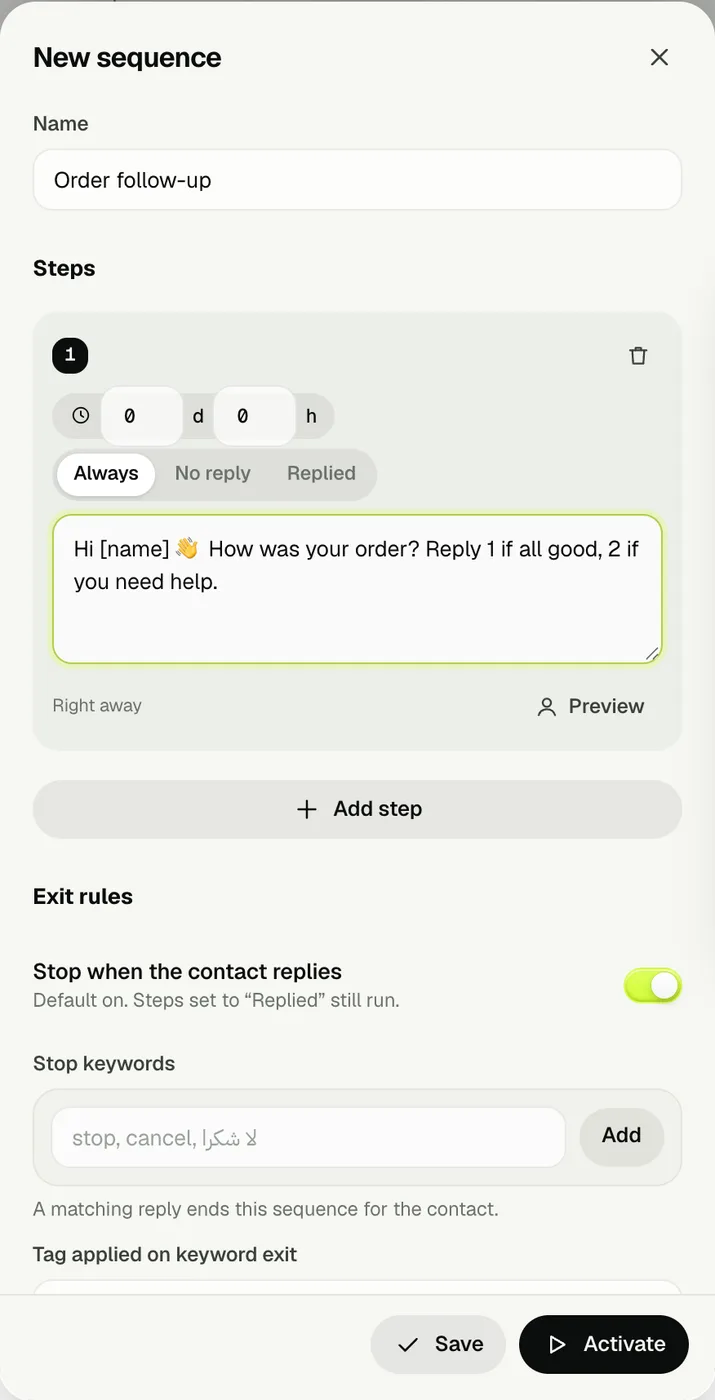
02 · EXIT RULESStop when they reply, or say a keyword.
Stop when the contact replies is on by default, so nobody gets a reminder after they've answered. Add stop keywords (stop, cancel, لا شكرا) to end the sequence for that person, and optionally tag them when they do.
- People on your opt-out list are removed from every sequence immediately.
- Steps set to Replied still run for people who answered.
03 · ENROL CONTACTSStart from a campaign, a file or a pasted list.
Choose Enrol contacts. From a campaign enrols the people it reached who haven't replied — perfect for a second nudge. You can also drop an Excel or CSV file, or paste one number and name per line.
- Duplicates, opt-outs and invalid numbers are skipped and counted.
04 · ACTIVATE AND WATCHActivate it and see where everyone is.
Press Activate. Wassender checks for due steps in the background and sends them with the same pacing, daily limit, sending hours and opt-out rules as your campaigns. Open a sequence to see each contact's current step.
- Steps send while WhatsApp Web is open on this computer.
- Designing is free; activating a sequence needs Unlimited.