← All guidesINTEGRATIONS · API · WEBHOOKS

Your store says “order shipped” — WhatsApp tells the customer.

Create an API key, paste it into your store or automation tool, and messages it sends go out through your own WhatsApp — paced, opt-out safe and inside your sending hours, exactly like a campaign.

01 · CREATE A KEY

One key per store or tool.

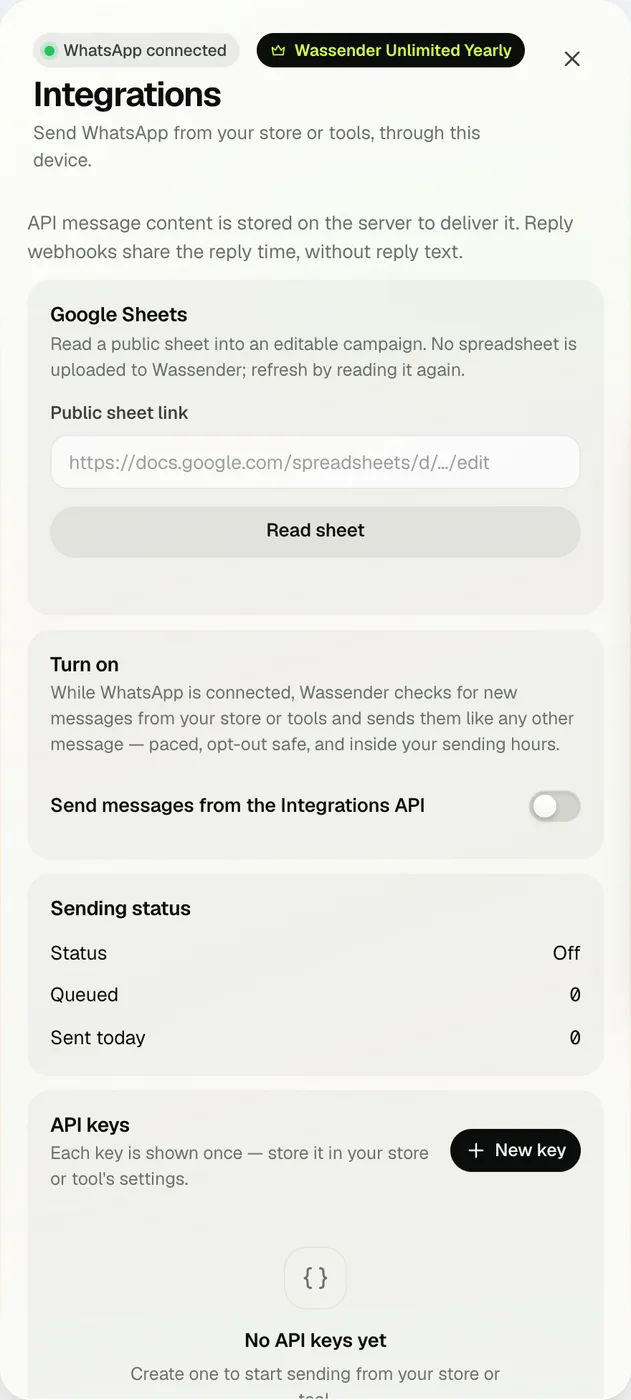
Open Account → Integrations & API → New key. Name it after where it will live, optionally set a daily send limit and allowed IP addresses, then copy the key — it is shown only once.

  • Revoke a key and anything using it stops immediately.
  • Developer reference and examples: wassender.genoun.com/developers.
Integrations panel with Google Sheets, sending status and API keys
Integrations in the real extension
02 · TURN ON SENDING

This computer does the sending.

Switch on Send messages from the Integrations API. While WhatsApp is connected, Wassender checks for new messages from your tools and sends them like any other message. Sending status shows whether it is watching, waiting for sending hours, paused for a campaign or at its daily limit.

  • A send whose outcome is uncertain is never retried automatically.
03 · WEBHOOKS

Get told when a message sends, fails or gets a reply.

Add your webhook URL and Wassender posts an event for each send, failure or reply. Every request is signed with HMAC-SHA256 in the X-Wassender-Signature header — verify it with your webhook secret. Send test event checks your receiver.

  • Reply webhooks share the reply time, not the reply text.
  • Rotate the secret any time; update your receiver after.
04 · GOOGLE SHEETS

Start a campaign from a shared sheet.

Paste a public Google Sheets link and press Read sheet. Wassender reads it into an editable campaign; pick the phone column and continue like a spreadsheet import. The sheet is not uploaded to Wassender — read it again to refresh.

Your first API message

Replace the key and number, then run this from a terminal. The message is queued and sent by your computer at your normal pace. Reuse the same Idempotency-Key when you retry, so a message is never queued twice.

curl -X POST https://api.wassender.genoun.com/api/v1/public/messages \
  -H "Authorization: Bearer wsk_live_…" \
  -H "Content-Type: application/json" \
  -H "Idempotency-Key: order-1042-shipped" \
  -d '{"to":"201001234567","text":"Hi Mona, your order A-1042 has shipped 🚚","tag":"order_update"}'

Full request fields, error codes and webhook payloads are on the developers page.

What is stored, and where

API message content is stored on the Wassender server only so it can be delivered to your computer for sending. Integrations is part of Wassender Unlimited.

NEXT GUIDE

Keep every send safe.

API messages share the same pace and limits as campaigns.

Read the safe sending guide
Chat with us