← All guidesINBOX · FOLLOW-UPS

Answer the people who answered you.

A campaign is only the start. Inbox gathers every reply, shows which chats have waited too long, and keeps what you know about each customer next to the chat.

01 · CAMPAIGN REPLIES

Every reply from the last 14 days, newest first.

Open Inbox to see people who replied to a campaign or a sequence. Reply from the panel or open the chat, then mark a person Interested or Won so the tabs at the top keep score.

  • Tabs: Unanswered, Interested, Won and All.
  • A reply in the panel can use your saved templates.
02 · UNANSWERED CHATS

See who has been waiting on you.

Wassender checks your chats and lists the ones waiting on you longer than your threshold, with how long each has waited. The Inbox icon in the dock shows the count, so you notice without opening anything.

  • Alerts pause outside your sending hours.
  • All caught up means no chat waited longer than your threshold.
03 · THIS CONTACT

Notes, tags and a reminder for the open chat.

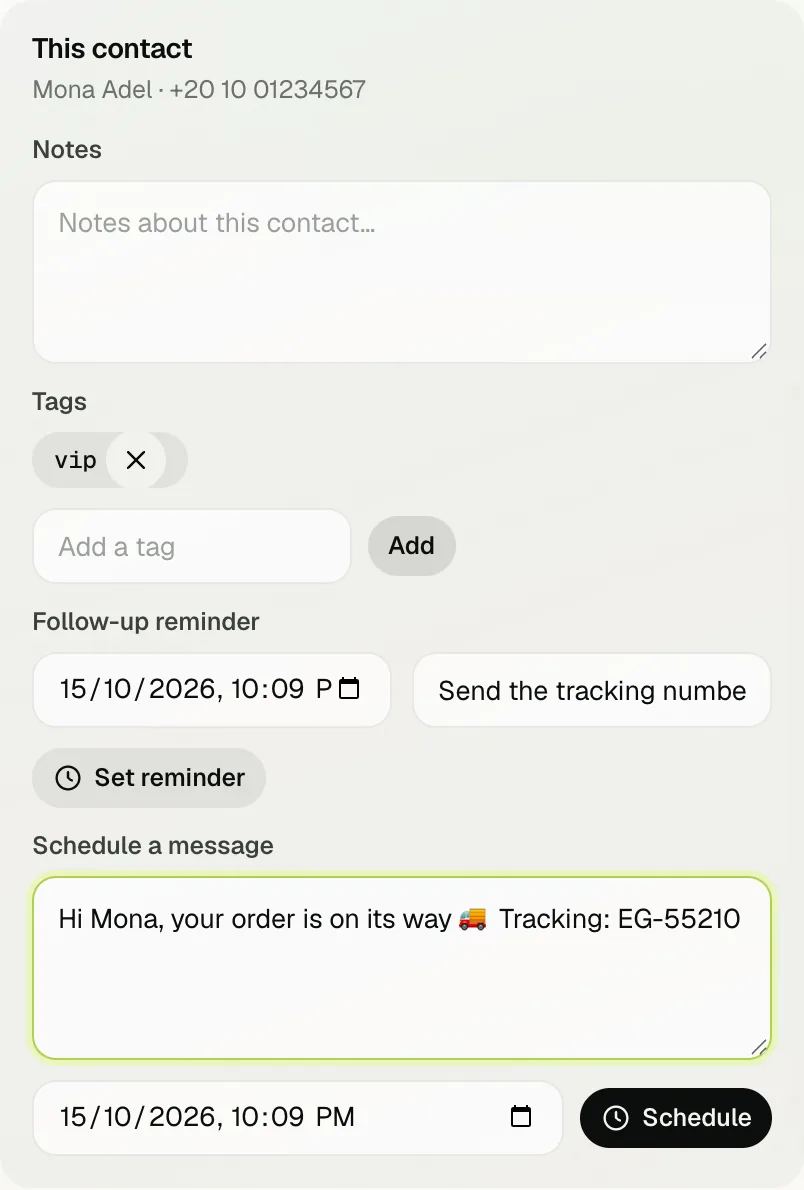
Open any chat in WhatsApp and Inbox shows a This contact card: write a note (size M, paid by transfer), add tags such as VIP, and set a follow-up reminder for a time in the future.

  • Tags help you build an audience later.
  • When a reminder is due, it appears at the top of Inbox and in Today.
This contact card with a note, a tag and a reminder
What you know about a customer stays next to the chat
04 · SEND LATER AND REPLY FASTER

Schedule one message, or type / for a saved reply.

Under Schedule a message, write a message for this person and pick a time — Wassender sends it while WhatsApp Web is open. In WhatsApp's own message box, type / and a template's shortcut to paste it with the customer's name already filled in.

  • Scheduled single messages are listed at the bottom of Inbox.
  • Set a template's shortcut in Templates.

A day with Inbox: from a reply to a sale

  1. 10:00 — your order-ready campaign goes out to 40 customers.
  2. 10:20 — Mona replies “Can you deliver?”. She appears in Inbox → Unanswered.
  3. You answer, mark her Interested and write a note: “Delivery Thursday, Giza”.
  4. You set a reminder for Thursday 9:00: “Send the tracking number”.
  5. Thursday — the reminder shows at the top of Inbox; you send the number and mark her Won.

What needs Unlimited

Inbox — replies, notes, tags, reminders and scheduled single messages — is part of Wassender Unlimited. Nothing in Inbox is sent to a customer unless you press Send or Schedule.

NEXT GUIDE

Let follow-ups run on their own.

Sequences send a reminder, then a nudge, and stop the moment someone replies.

Read the sequences guide
Chat with us