← All guidesENGLISH & ARABIC · RIGHT TO LEFT

Arabic support that feels at home.

Switch languages from the site or extension. The interface changes direction naturally, while Arabic-aware message tools help your team reply in the language customers use.

On this pageChoose a section
01 · A REAL RTL INTERFACE

The layout follows the way you read.

Switch the extension language to Arabic and the panel changes to a right-to-left layout. Controls, navigation and the campaign flow use Arabic labels; Arabic and Latin text remain readable together.

  • Choose Arabic or English in the extension preferences.
  • The panel direction and labels update with the language.
  • The extension can follow WhatsApp’s light or dark appearance.
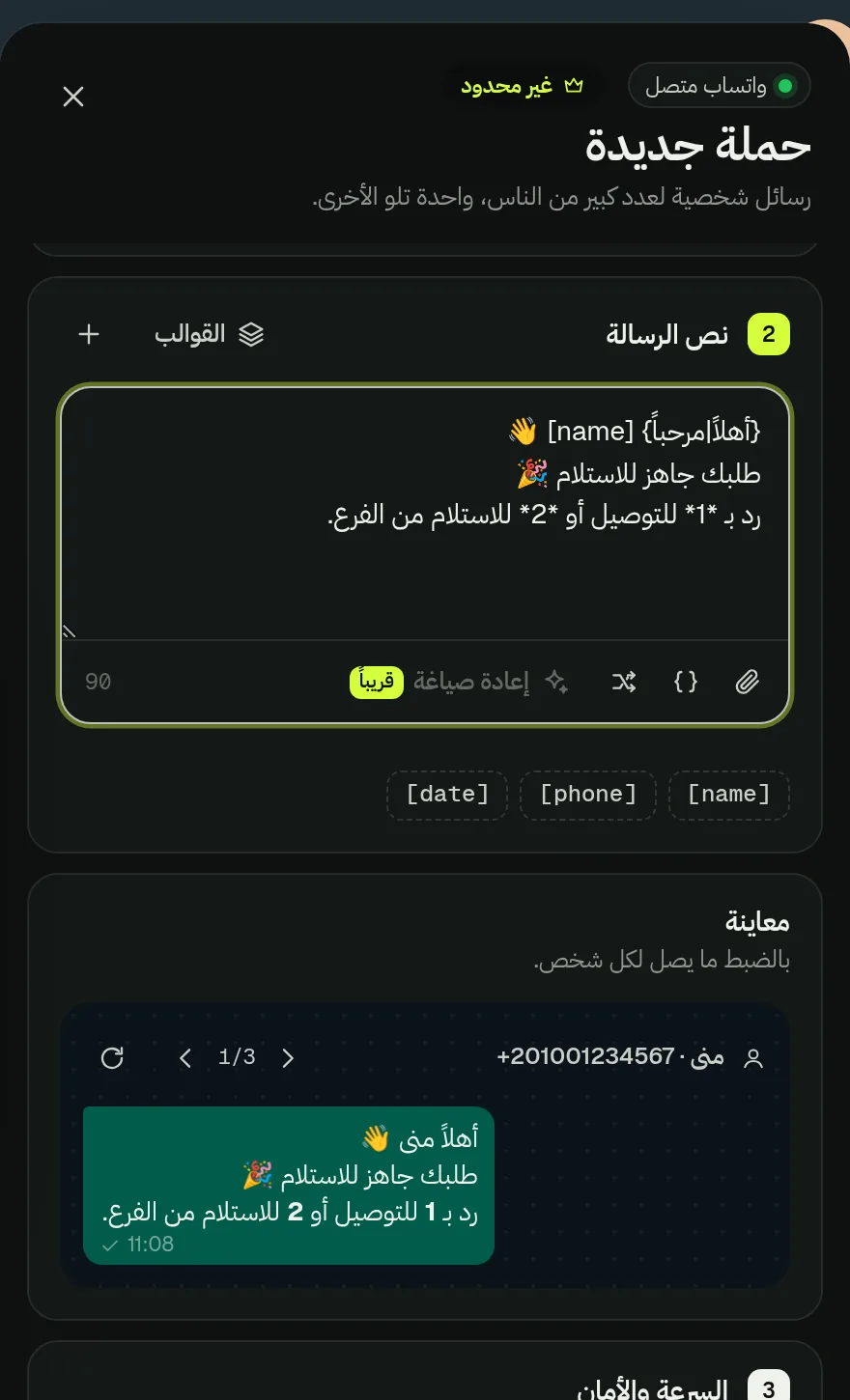
Real Wassender extension screenshot of an Arabic right-to-left campaign editor and message preview
A real Arabic campaign editor and rendered message preview
02 · WRITE ARABIC CAMPAIGNS

Mix Arabic copy with the fields you already use.

Write the message in Arabic and insert a customer field such as [name]. The preview renders the final copy in the direction appropriate to its content.

  • Use the same spreadsheet fields for Arabic and English campaigns.
  • Preview names, numbers and mixed-direction text before sending.
  • Use the recipient controls to check more than one example.
Real Arabic Wassender message draft with a resolved RTL WhatsApp preview
Check Arabic copy and mixed Arabic-Latin values in the preview
03 · MATCH ARABIC KEYWORDS

Account for common spelling variations.

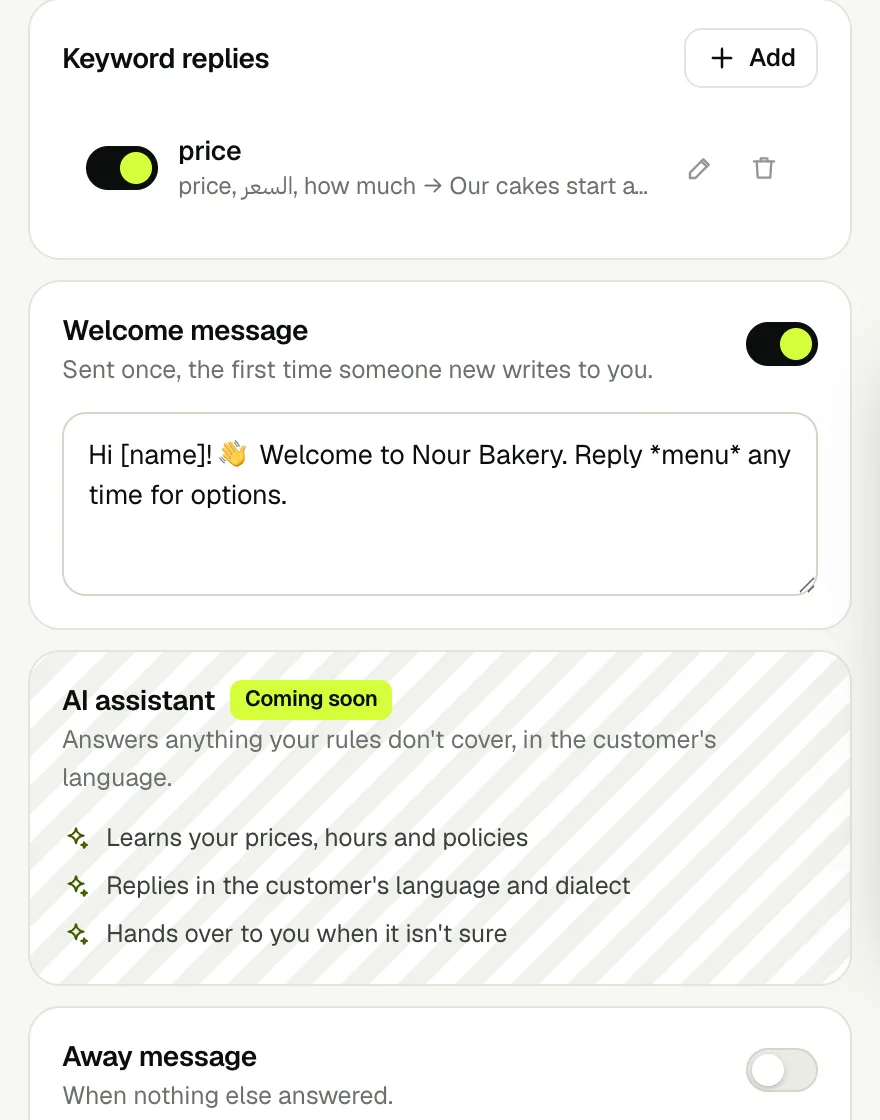
Autopilot recognizes common Arabic spelling variations in keyword rules, so one helpful answer can cover the ways customers commonly type the same word.

  • Add Arabic keyword variations separated by commas.
  • Test the wording in the Autopilot simulator before enabling the rule.
  • Keep the answer aligned with your current prices, hours and policies.
Explore the Autopilot guide →
Real Autopilot keyword rule containing English and Arabic spellings
Add Arabic spelling variants to one keyword rule

Use Arabic without changing your spreadsheet workflow

  1. With an English Name column, write “أهلاً [name|عميلنا العزيز]، طلبك جاهز”. A customer named منى receives “أهلاً منى، طلبك جاهز”. An empty name uses عميلنا العزيز.
  2. With an Arabic الاسم column, use [الاسم]. Choose fields from the chips and check the preview so Arabic words, phone numbers and order IDs remain easy to read together.
  3. For Arabic keyword replies, add the words customers actually send, such as “السعر, بكام”. Test the spelling variants in Try it before enabling the rule.

Download and try the Arabic spreadsheet

Phoneالاسمالطلبالنقاط
12025550101منىA-104212
12025550102عمرA-10434
12025550103—A-104410
أهلاً [الاسم|عميلنا العزيز]، طلبك *[الطلب]* جاهز.
[if النقاط>=10?لك خصم 20% على طلبك القادم|لك خصم 10% على طلبك القادم]

Mona’s row becomes: “أهلاً منى، طلبك A-1042 جاهز. لك خصم 20% على طلبك القادم”. Omar gets A-1043 and 10%. The empty name uses عميلنا العزيز. Select Phone as the phone column; the Arabic headers remain available as variable chips.

Preview: the exact message for every row

Customer rowCustomer receives
1 · منىأهلاً منى، طلبك A-1042 جاهز.
لك خصم 20% على طلبك القادم
2 · عمرأهلاً عمر، طلبك A-1043 جاهز.
لك خصم 10% على طلبك القادم
3 · —أهلاً عميلنا العزيز، طلبك A-1044 جاهز.
لك خصم 20% على طلبك القادم

Arabic inputs and the message each customer sees

Input or settingExpected resultWhat to check
الاسم = منىأهلاً [الاسم] → أهلاً منىUse the Arabic column name inside the brackets.
الاسم is emptyأهلاً [الاسم|عميلنا العزيز] → أهلاً عميلنا العزيزThe fallback keeps the greeting understandable.
English column Name; Arabic messageأهلاً [name] → أهلاً MonaThe language of the message can differ from its headers.
النقاط = 10[if النقاط>=10?خصم 20%|خصم 10%] → خصم 20%Arabic headers work in conditions too.
Customer asks “بكام”Matches Any word rule containing بكامAdd the actual phrases your customers use.
EXPLORE ALL GUIDES

See how the rest of the workflow fits together.

Browse campaigns, safe sending, Autopilot and reports with real screenshots from the extension.

Back to all guides
Chat with us